QualiConnect · voice

Your phone,answered
every time.

QualiConnect answers in your company's name, knows who is calling, books the job into the dispatch software you already run, and wakes the right person when it cannot wait until morning. An HVAC company on ServiceTitan has been live on it since spring 2026.

Do not read about
a voice agent. Call one.

Thirty seconds on the phone will tell you more than this whole page. Interrupt it. Talk over it. Give it a made-up emergency and listen to how it changes gear.

The demo line
+1 (929) 593-4959

Sandy is our demo agent, configured the way a contractor's front desk would be. It is a demo line, so nothing you say books a real job or reaches a real customer.

The 75-second version
Explainer video slot assets/demo/qualivoice/explainer-75s.mp4
A 75-second narrated explainer of the QualiConnect call path. In production with our content desk, from the storyboard the product team is writing.

The call on the left.
The work on the right.

The left column is what the caller hears. The right column is everything the system does while they are still talking: the lookup, the priority call, the availability check, the booking, the escalation. Nobody is typing any of it.

Northshore Plumbing and Heating is our demo tenant, a business we made up so we can show you the software without showing you somebody else's customers. The call is scripted. Every step on the right names the component that actually performs it, and a real call of this shape runs just under three minutes, compressed here so you can watch the whole thing.

Six moments,
start to finish.

This is the shape of every day on the phone, whether you take four calls or four hundred.

1
The call comes in

It answers on the first or second ring, in your company's name, at 9 AM and at 2 AM. There is no queue, no hold music, and no difference between the first caller and the fifth one at the same moment. Overflow during your busiest hour is the same path as a Sunday night.

You choose how it opens, what it is allowed to promise, and what it must never say.

2
The caller is recognized

Before it says the second sentence, it has matched the number against your customer records: who they are, the address you serviced, the equipment you put in, what happened last time. A returning customer does not get asked to spell their street name again.

A number it does not know is treated as a new lead and captured as one, with the details you need to call back.

3
The job is booked into your dispatch software

It checks live availability in the system you already run, offers a window it can actually honor, and writes the job in with the notes, the transcript, and a link to the recording. Your software stays the source of truth. Nothing lands in a separate inbox for someone to retype in the morning.

4
An emergency wakes the right person

You define what counts as an emergency: no heat, no power, water, a named account, a specific phrase. When one comes in, it does not sit in a queue waiting to be noticed. It starts climbing the ladder below, and it keeps climbing until a human accepts it.

Everything else waits politely for the morning, which is the point.

5
The message is taken properly

Not every call is a job. Some are a supplier, a landlord, somebody who wants Eric specifically. It takes the message the way a good receptionist takes a message: who called, what they want, what number to use, how urgent it sounded, and whether they are already a customer.

That message goes out as an email and as a card in your Teams or Slack channel, so it is in front of the person who can act on it instead of on a sticky note.

6
You see all of it the next morning

The portal has every call: who called, how long, the full transcript, the recording, what it booked, what it escalated, and what it could not handle. Filter it, search it, or just read last night's dozen calls in two minutes with your coffee.

Monthly, it rolls up into the numbers you would actually use to judge it: calls answered, jobs booked, minutes used, what it cost.

It does not stop
at one unanswered phone.

This is what "wakes the right person" actually means. Here is an emergency call first, and then the ladder it sets off. Each rung fires only if the one before it did not get an answer, and every timing is a number you set, not one we impose.

In your Slack,
your Teams, your inbox.

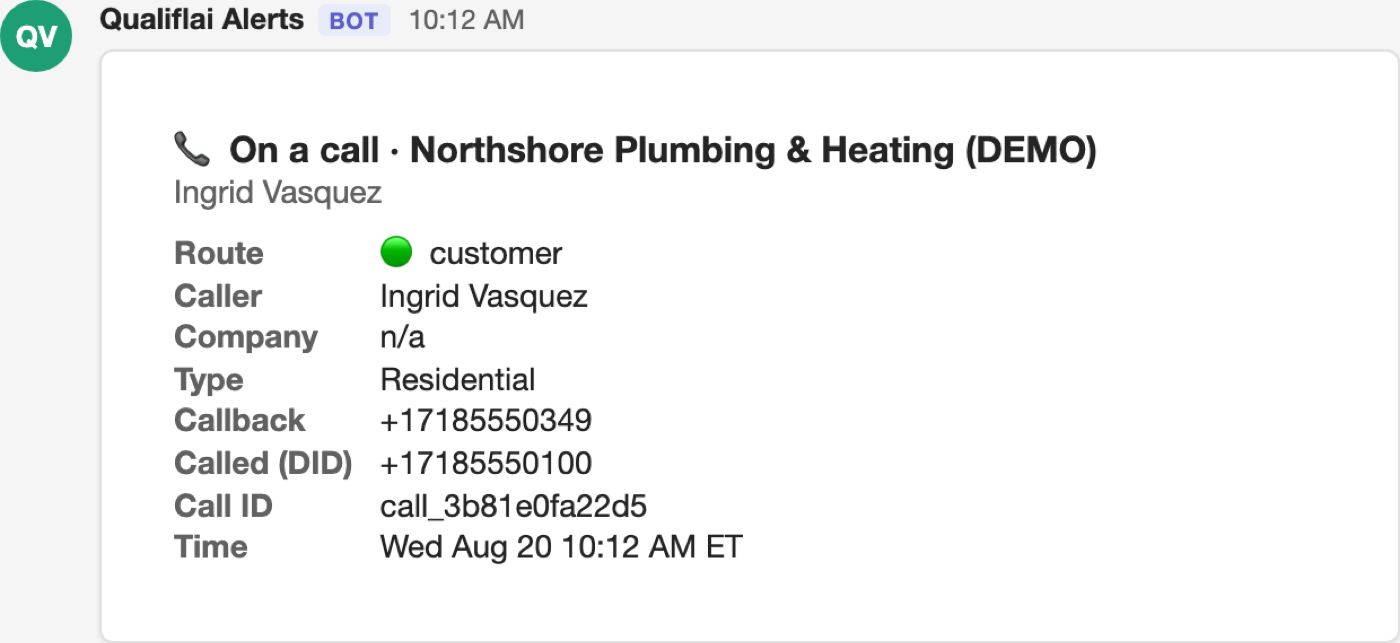
Most of what QualiConnect does on the phone reaches you as a card or an email, not as a screen you have to remember to open. These are the real renders. Teams is shown here, and the same cards post to Slack.

Microsoft Teams
A chat card headed On a call, posted while the call is still live. It lists the route as customer, the caller's name, the type of property, the callback number, the number they dialed, a call reference and the time.
The emergency card: caller, callback number, what they said, and a button to accept it or hand it to somebody else.
Microsoft Teams
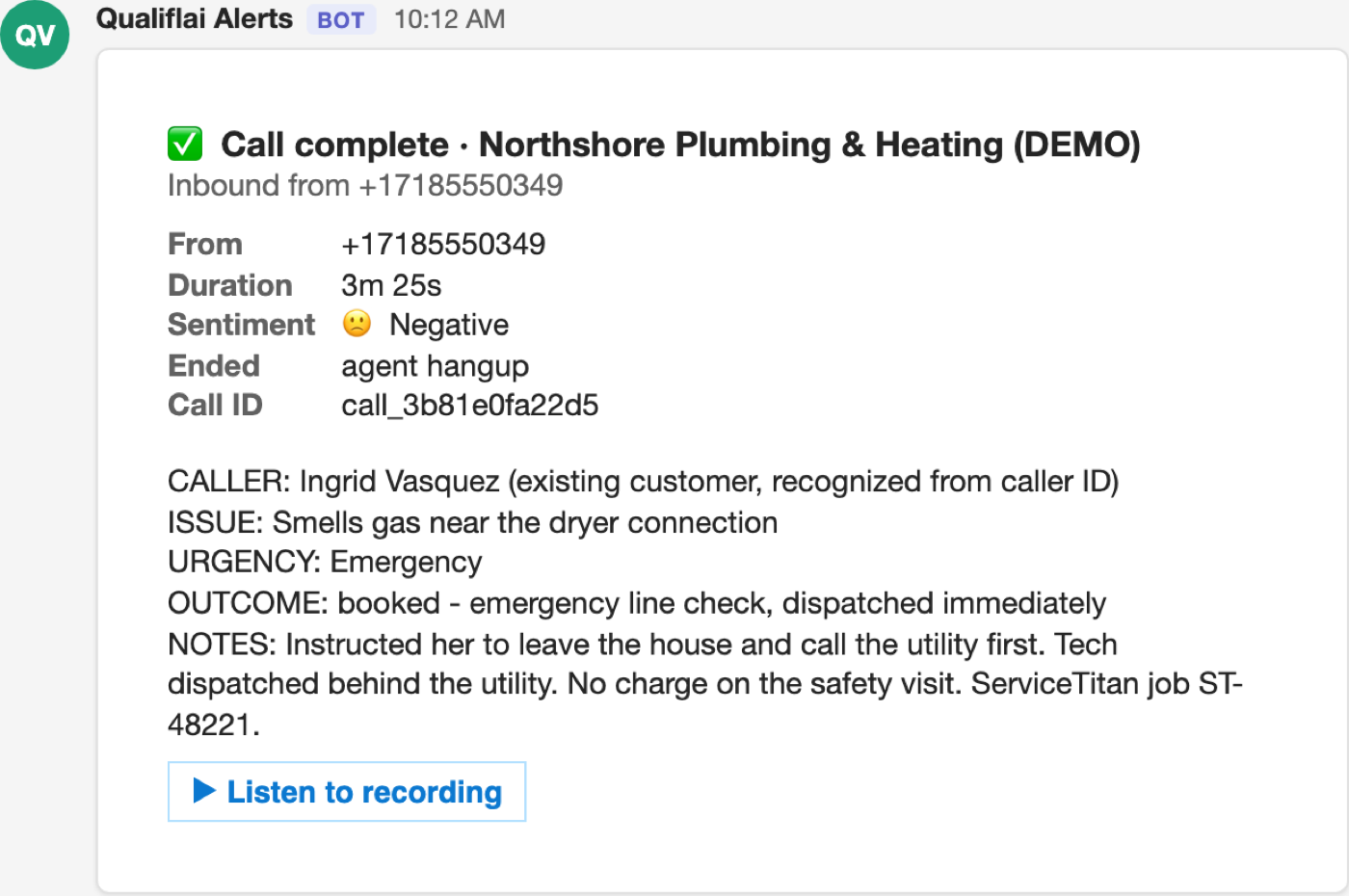
A chat card headed Call complete. It lists the caller's number, a duration of three minutes twenty five seconds, negative sentiment, and how the call ended, then a written summary: who called, that they smelled gas near the dryer connection, that it was an emergency, that an emergency line check was booked and dispatched, and a note saying the caller was told to leave the house and call the utility first, with the dispatch job number. A Listen to recording button sits at the bottom.
The closeout card, once somebody has accepted: who took it, what was promised, and where the recording is.
Email
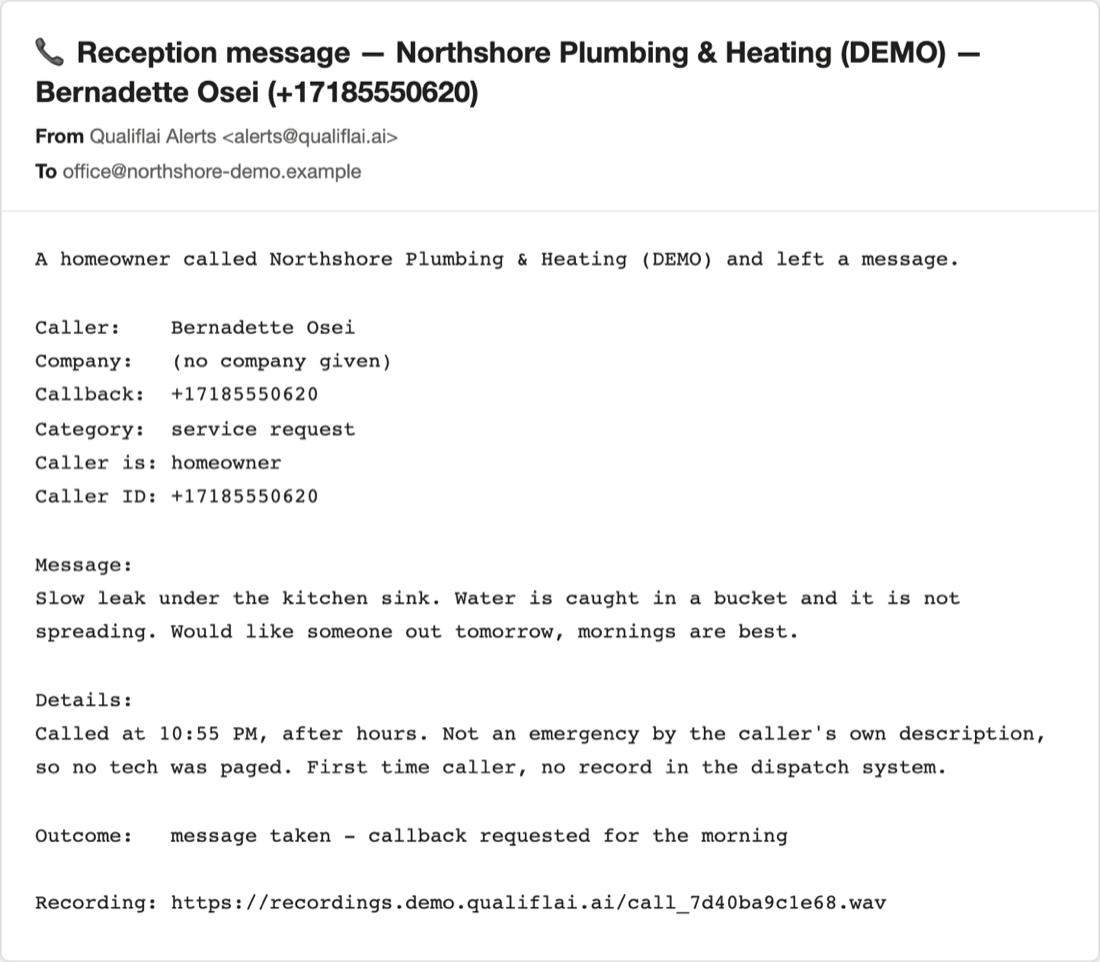
An email to the office inbox headed Reception message, naming the business and the caller. It lists the caller, callback number, category of service request, and that the caller is a homeowner, then the message itself about a slow leak under the kitchen sink and a request for somebody in the morning. A details block records that the call came in at 10:55 PM after hours, that the caller did not describe it as an emergency so no tech was paged, and that this is a first-time caller with no record in the dispatch system. The outcome reads message taken, callback requested for the morning, with a link to the recording.
The message email: who called, what they want, what number to use, and how urgent it sounded.

The screen you check
once a day, not all day.

The product mostly runs without you. The portal is where you go when you want to check on it, listen back to something, or show a number to somebody.

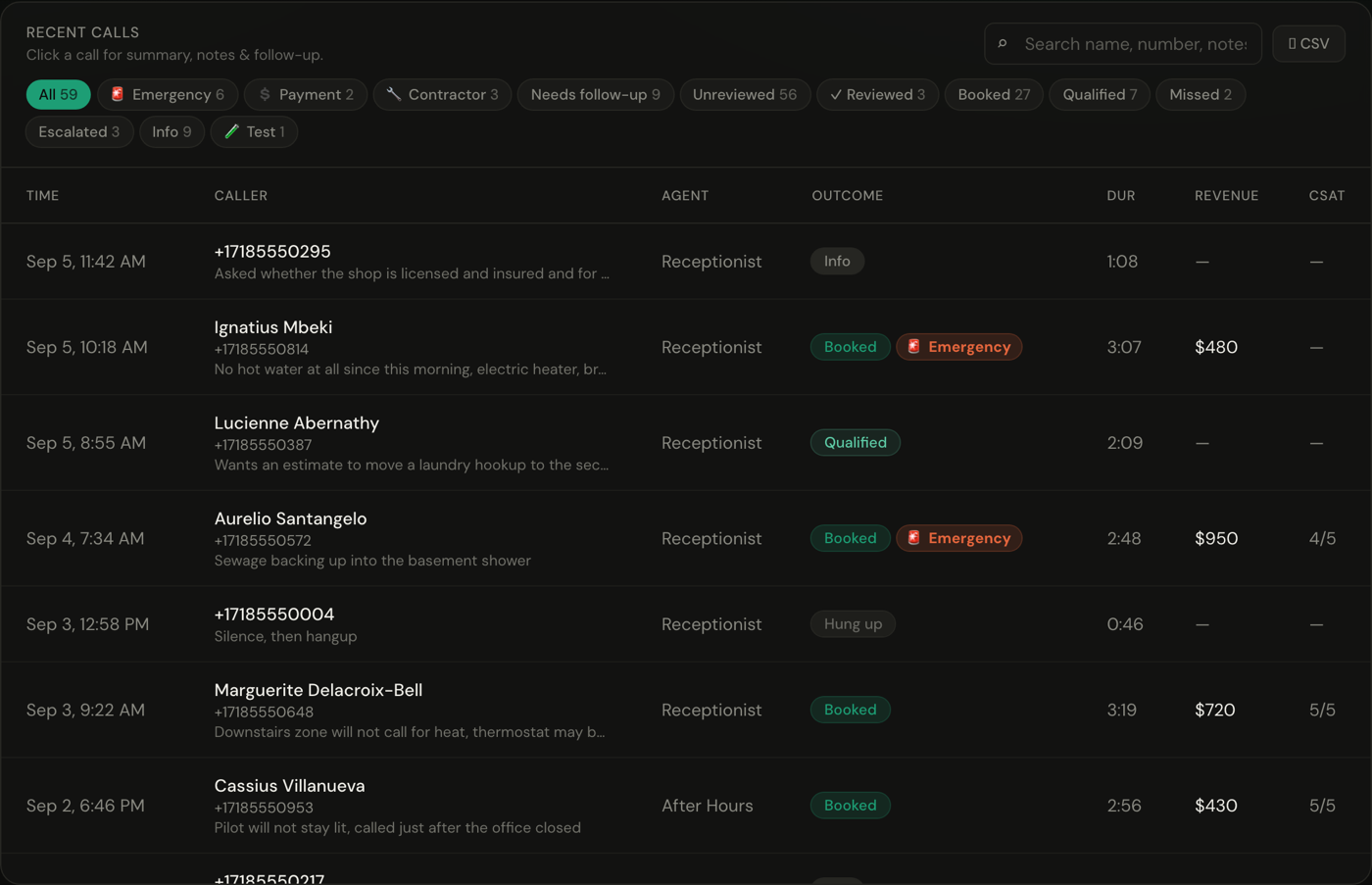
A recent calls list with filter chips across the top counting the calls by kind: 59 in total, 6 emergency, 27 booked, 9 needing follow-up, 2 missed. Each row shows the time, the caller's name and number, the first line of what they wanted, which agent answered, an outcome badge such as Booked, Qualified, Info or Hung up, the call length, the revenue booked, and a satisfaction score.
The calls list: every call that came in, who it was, how long it ran, and what happened as a result. This is the demo tenant, so the callers and the dollar figures are invented.
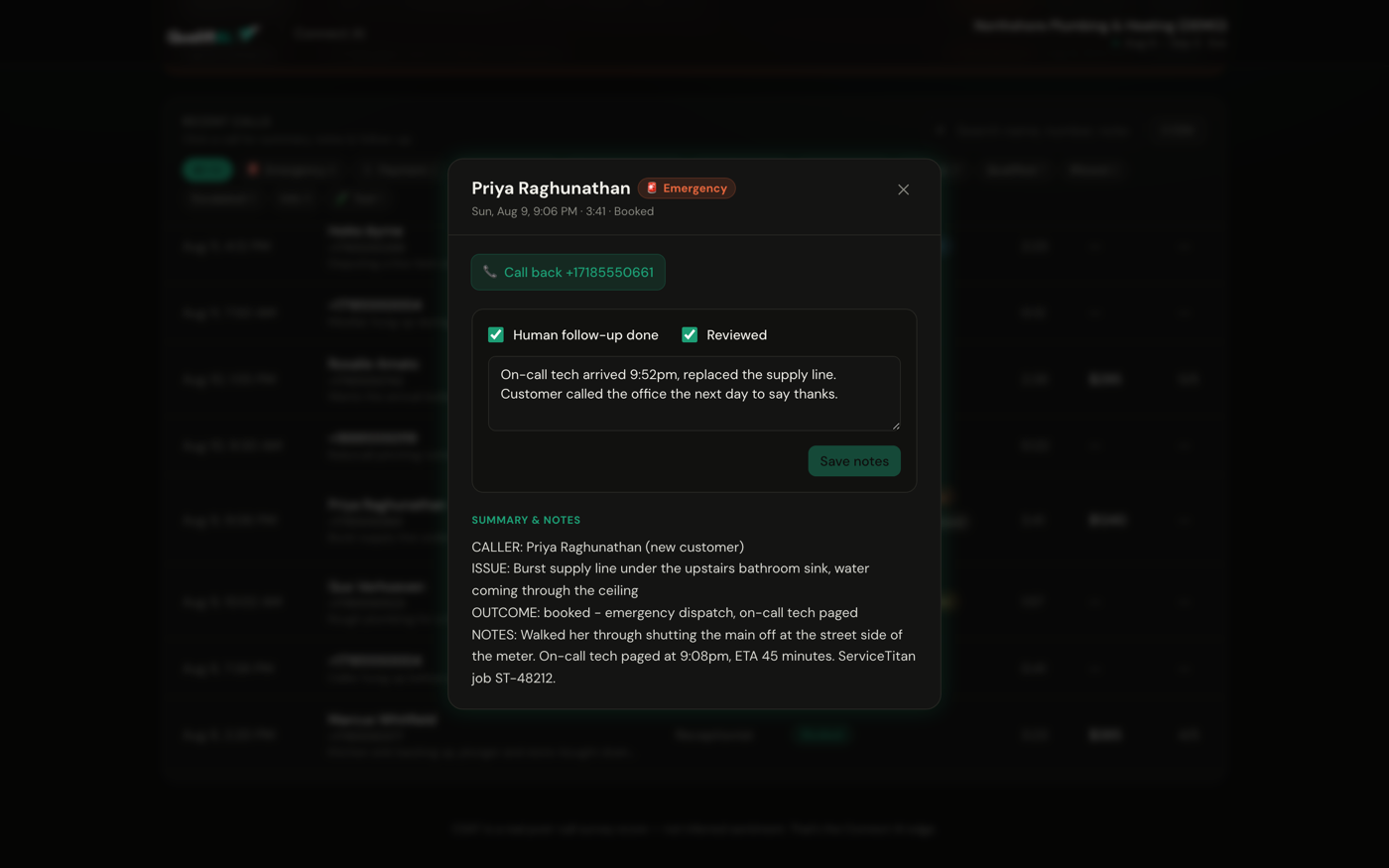
One call opened up. The header gives the caller, an Emergency badge, the date, the length and the outcome. Under it sits a call back button on the caller's number, checkboxes marking human follow-up done and reviewed, and a free-text note recording that the on-call tech arrived at 9:52 PM and replaced the supply line. Below that, a summary of the call: who the caller was, the burst supply line under the bathroom sink, the outcome of emergency dispatch, and notes covering the shutoff instructions given on the phone, the time the tech was paged, the ETA, and the dispatch job number.
One call: what was said, what it did, the job number it created, and the note your team added afterward.
Product screenshot pending assets/demo/qualivoice/03-booking-in-dispatch.png
The same job inside your dispatch software, with the notes and the transcript attached to it.
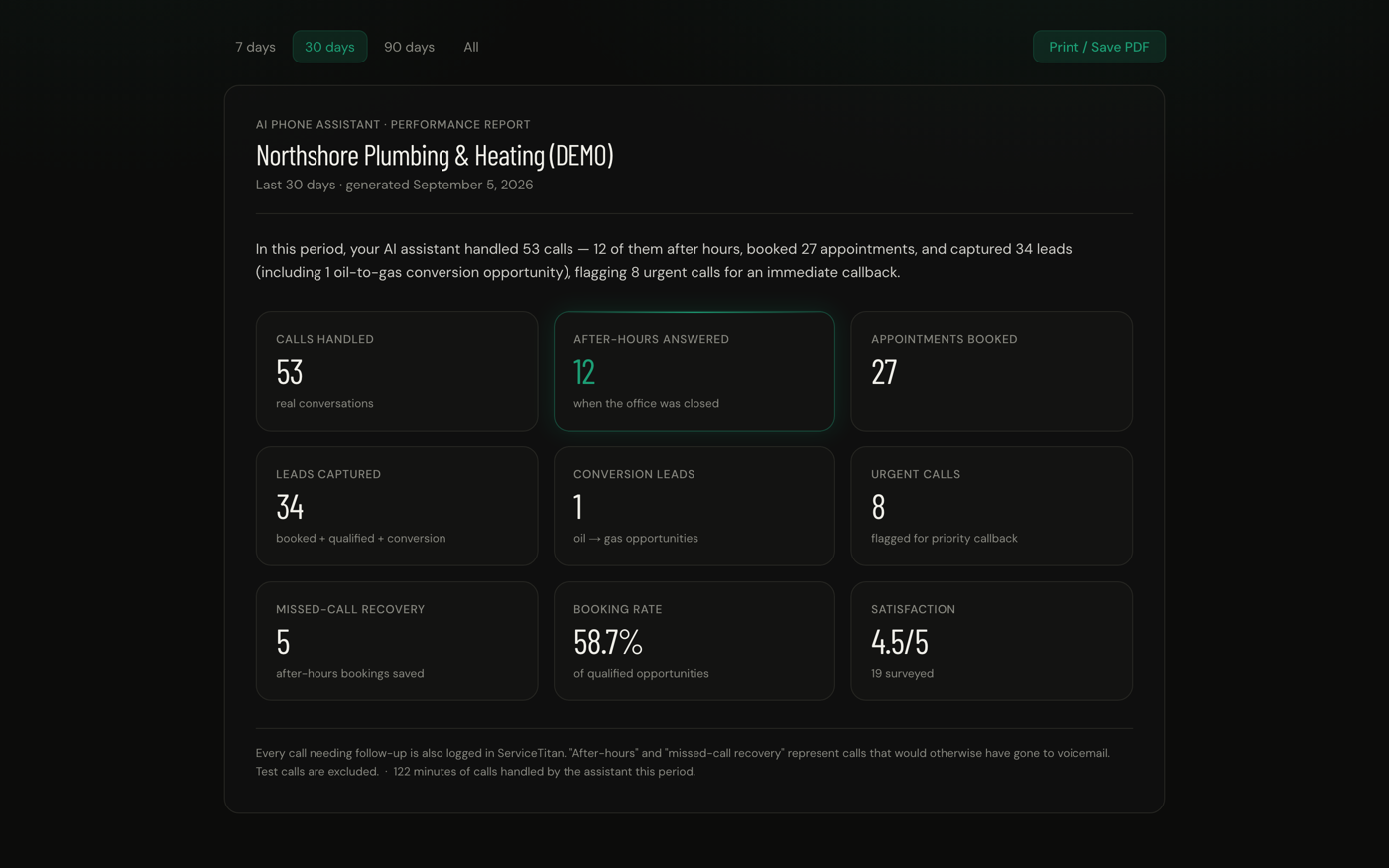
A monthly performance report for the demo tenant, with a plain-English opening line and then nine tiles: 53 calls handled, 12 answered after hours, 27 appointments booked, 34 leads captured, 1 conversion lead, 8 urgent calls flagged for callback, 5 after-hours bookings saved, a 58.7 percent booking rate, and 4.5 out of 5 satisfaction across 19 surveyed. A footnote records that every call needing follow-up is also logged in the dispatch system, that test calls are excluded, and that 122 minutes of calls were handled in the period.
The monthly view: calls answered, jobs booked, minutes used, and what the month cost.

It works inside
what you already run.

We do not ask you to move your business into our software. QualiConnect writes into yours, and your system stays the record. If yours is not on this list, ask us: the pattern is the same wherever there is an API.

ServiceTitan Housecall Pro Jobber Autotask ConnectWise GoHighLevel Microsoft 365 and Teams Slack Google Workspace and anything with an API

One line, and
we mean it.

$499 a month, including 500 minutes

After the first 500 minutes, $1.00 a minute, billed in 15-second increments rounded up per call. Calls that do not connect are not billed. Onboarding from $1,500.

We bill in 15-second increments because rounding every call up to a full minute quietly inflates a bill by a lot on short calls, and most calls are short. You can see the per-call detail in the portal any time.

Fifteen minutes.
Nothing to install.

Michael or Chris runs it
A person from our team, not a call center and not a sales development rep reading from a script.
Screen shared, phone or computer
Nothing to install and nothing to connect. You watch our screen. Fifteen minutes, and we hold to it.
Your scenario, not ours
Your busiest hour, your worst caller, your dispatch software. We run it against the real thing.

Hear it, then
see it.

Call the demo line for thirty seconds. Book fifteen minutes if it is worth a closer look.

Demo line: +1 (929) 593-4959. It is a demo, so nothing you say books a real job.